YouTube Video Has No Transcript (or Transcript Not Showing)?
Quick answer: Most videos that seem to have “no transcript” actually do — the panel is just easy to miss, especially on mobile, or the video only has auto-generated captions that the panel doesn’t advertise. Paste the link into TranscriptFlow: if any caption track exists (manual or automatic, in any language) you get the full text in seconds. The only videos that truly can’t be transcribed are ones with no caption track at all — usually brand-new uploads still processing, live streams in progress, or videos where the creator disabled captions.
Quick checklist: transcript option missing?
- On desktop: click …more under the video title, scroll to the end of the description and click Show transcript.
- In the mobile app: tap the description, scroll to the Transcript section and tap Show transcript. It isn’t there on every video, and Shorts don’t have it.
- Check the CC button. If the captions menu lists no tracks at all, the video has no transcript yet.
- Uploaded in the last few hours, or live right now? Auto-captions aren’t ready yet — check back later.
- Still unsure? Paste the link into TranscriptFlow. If any caption track exists, you’ll get the full text; if not, it tells you no captions are available.
Why the transcript option is missing
There are five different situations that all look like “no transcript” from the outside. Knowing which one you’re in tells you what to do.
- You’re on the mobile app. The YouTube app tucks the transcript into the description, doesn’t offer it on every video or on Shorts, and doesn’t let you copy from it. The captions usually exist — the button is just hard to find. Use the Share-link method instead.
- The video only has automatic captions. YouTube’s desktop panel appears for auto-captions too, but it’s buried under “…more → Show transcript” and often loads slowly. A web tool reads the same auto-caption track directly.
- The video was just uploaded. Auto-captions take anywhere from a few minutes to several hours to generate, depending on length and language. Check back later.
- It’s a live stream (or a recent one). Live captions aren’t saved as a transcript until YouTube finishes processing the recording after the stream ends — typically within a day.
- The creator disabled captions. Channel owners can turn off automatic captions, or the language may not be supported by YouTube’s speech recognition. In this case no caption track exists and no tool can read one.
How to check whether captions actually exist
Paste the video link into TranscriptFlow. If a caption track exists in any language, the transcript appears — that’s the definitive test. If the video has captions only in another language, use the translate menu to convert them. If you get a “no captions available” message, the video has no track and you’re in situation 3, 4 or 5 above.
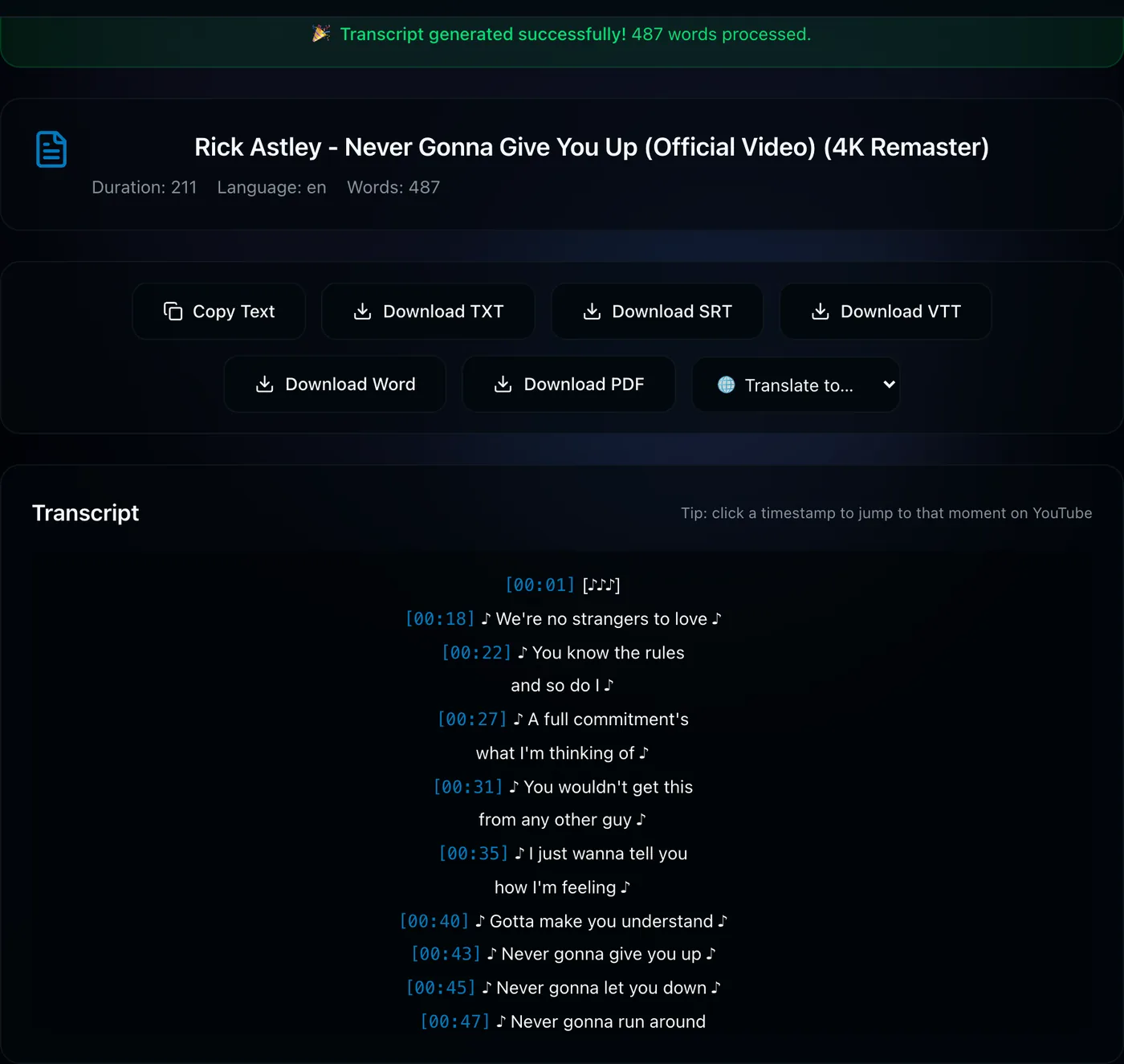
5 ways to get the text anyway
1. Use a web transcript generator
Works for situations 1 and 2 — the vast majority of cases. Paste the link, press Get Transcript, copy or download. Nothing to install, works on phones.
2. Wait for processing
For fresh uploads and just-ended live streams, come back in a few hours. YouTube will add the auto-caption track once its speech recognition finishes.
3. Use another language’s track
Some creators upload captions only in their own language. Fetch that track and translate it — YouTube provides the translation and you keep the timing.
4. Ask the creator
If captions are disabled, a polite comment often works — enabling auto-captions is one click in YouTube Studio and improves their reach.
5. Transcribe the audio yourself
For a video with no caption track at all, you need speech-to-text software that listens to the audio (for example the dictation feature in Word or Google Docs while the video plays, or a dedicated transcription app). This is the only case where a caption-based tool like ours can’t help — and we’d rather tell you that than pretend.
YouTube transcript not working — fixes
Sometimes the button is there but the transcript won’t open, stays blank, or keeps loading. Try these in order:
- Reload the page (or close and reopen the app). The transcript panel loads after the rest of the page, and a slow connection can leave it empty.
- Update the YouTube app. Older versions may not have the transcript section in the description.
- Turn off extensions. Ad blockers and YouTube “enhancer” extensions can break or hide the panel. Test in a private/incognito window with extensions disabled.
- Try another device or browser. If it works on desktop but not on your phone, it’s the app, not the video.
- Check whether captions exist. Paste the link into TranscriptFlow. If the transcript appears there, the captions are fine and the problem is YouTube’s panel — copy or download the text from our page instead.
- Private or members-only video? Outside tools can only read public captions, so these won’t work in any transcript tool.
Try the definitive test: paste the link — if captions exist in any language, you’ll have the full transcript in seconds.
Check the video →Frequently asked questions
Do all YouTube videos have transcripts?
No. A transcript exists only when a video has a caption track — captions the creator uploaded, or YouTube's auto-generated captions. Most spoken videos in supported languages get auto-captions, but brand-new uploads, live streams in progress, videos with captions turned off, and videos with no speech or an unsupported language may have none.
Why is the YouTube transcript option missing?
Usually because the button is hard to find, not because captions are missing. On desktop it sits at the end of the description under …more → Show transcript; in the mobile app it is in the description's Transcript section on many videos, and it does not appear on Shorts. If the video has no caption track at all — too new, live, captions disabled or an unsupported language — there is no transcript option anywhere.
Why is YouTube transcript not working?
Common causes are a page that has not fully loaded, an outdated app, a browser extension or ad blocker that changes YouTube's page, or a video that has no caption track yet. Reload the page, update the app, try a private window without extensions, or paste the link into a transcript tool to check whether captions exist.
Why do some YouTube videos have no transcript?
Either the video is too new for auto-captions to have finished, it is (or was recently) a live stream, the creator disabled captions, or the language is not supported by YouTube speech recognition. On mobile the transcript button is also easy to miss even when captions exist.
How do I get a transcript of a YouTube video that has no captions?
If there is truly no caption track, a caption-based tool cannot help; you need speech-to-text software that transcribes the audio. First confirm captions are really missing by pasting the link into a transcript generator — most “missing” transcripts are just hidden.
Can I get the transcript of a YouTube live stream?
Not while it is live. After the stream ends YouTube processes the recording and adds an auto-caption track, usually within a day, after which the transcript works normally.
How do I enable transcripts on my own YouTube videos?
In YouTube Studio open the video, go to Subtitles, and add captions or let YouTube auto-generate them. Once a caption track exists, viewers can read the transcript and tools can export it.